
YOUR VISA CARD FROM PROCREDIT BANK
With this card, you will have 24/7 access to your money. You will be able to perform transactions at any ATM and POS terminal, make payments to merchants and online wherever the Visa logo is accepted. Thanks to the Contactless functionality, the card allows you to pay for purchases at merchants both with contact and contactless using the chip (at POS terminals that display the Visa payWave symbol).
To use your card safely, please consider the following:
Card elements
Obtaining the PIN code
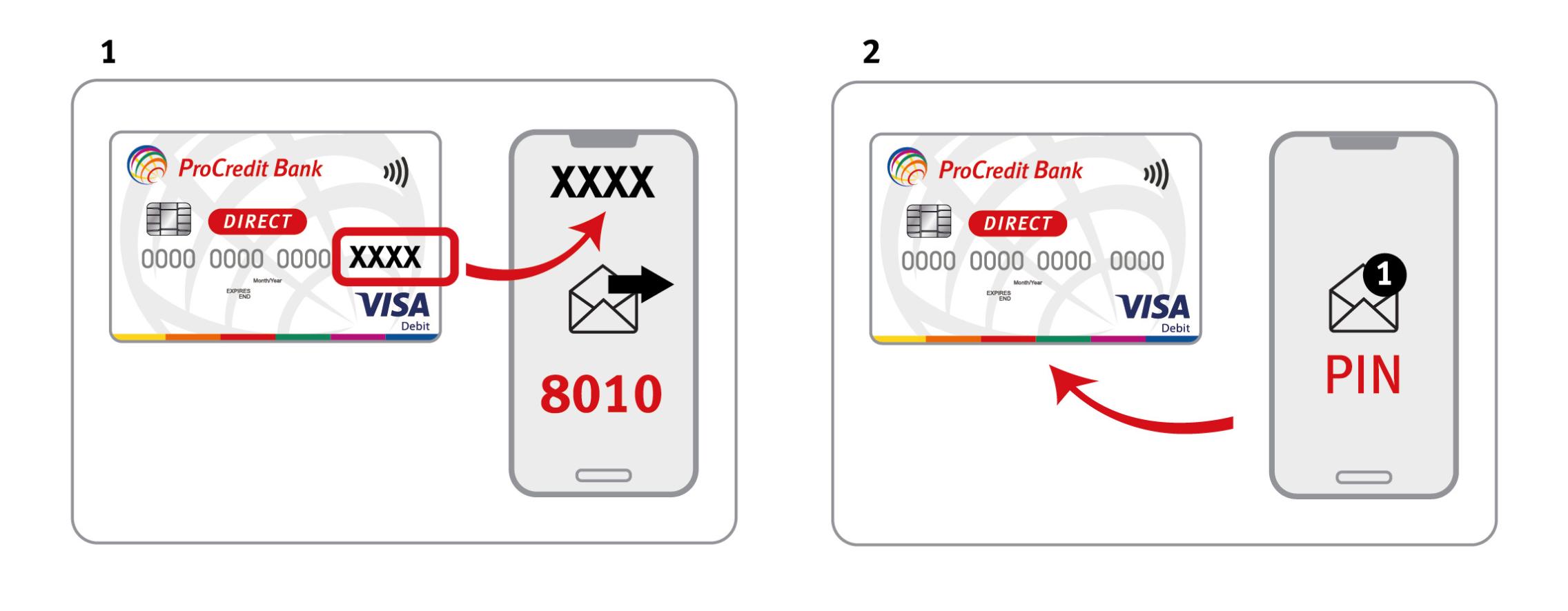
Using this card requires a PIN code. To obtain your PIN code, from the phone number registered in the Bank’s information system, send an SMS containing the last four digits of your card to 8010. You will receive an SMS with your card’s PIN code.
For security reasons, we recommend memorizing the PIN code and then deleting the SMS. Afterwards, you can change the PIN at a ProCredit Bank Moldova ATM by selecting the option “Change PIN” (this service is free of charge). When prompted, enter the default 4-digit PIN from the SMS you received and memorized, after which you will be asked to create a new PIN code to be used going forward.
 |
Card security
Be cautious when entering your card details or confirmation codes during online transactions and verify the authenticity of the websites you access.
Avoid using your card for payments on websites that ask you to provide card details via phone or email, on social networks, betting websites, etc.
Loss / Theft
If your card has been lost or stolen, or if your card’s confidential data has been disclosed, contact the Bank immediately at the following phone numbers: 0800 000 10 or +373 22 27 07 07. Working hours: Monday – Friday, 08:00 – 18:00, except public holidays.
You can also block your card самостоятельно via ProBanking or the Mobile Banking application (for individuals only).
Secure online payments
When accessing a secure website, the address bar changes from “http” to “https”. This confirms that the website has a security certificate (SSL). Check the address bar to ensure the company is legitimate and that any information you enter is encrypted.